What Is Loop Engineering? Plan, Act, Check, Stop, With Code
Loop engineering is designing the loop an AI agent runs: what it plans next, what it is allowed to do, how each result is checked, and the rules that make it stop. The model is one step in that loop. Everything around it is code you write, test and own.
IBM's definition, published on 17 July 2026, is "the practice of designing agentic workflows, or loops, that iteratively guide AI agents toward completing user-defined goals with minimal human intervention." This post shows the idea as a small, working loop, and the two runs that make the point better than any definition.
Run on 25 September 2026 with loop.py (standard-library Python 3.12), its 15 tests, and llama3.2:1b on Ollama 0.34.3. The same three runs gave the same output twice: once on the M1 Ultra's GPU, once on CPU in Docker (the kit's 04-ollama stack). Every call uses temperature 0 and a fixed seed. On the same Ollama version and model digest your output will likely match. Other versions or hardware can differ.
Why is everyone suddenly talking about loop engineering?
Because agents moved from demos to jobs that run unattended. US Google searches for "what is loop engineering" were zero every month from September 2025 to May 2026, then 1,600 in June and 1,900 in July (DataForSEO data in House of Loops keyword research, September 2026). LangChain's post "The Art of Loop Engineering" (16 June 2026) describes stacking loops, from the basic agent loop to a verification loop that scores output and retries. IBM's explainer (17 July 2026) contrasts it with prompt engineering: one designs a single instruction, the other designs "automated systems that self-prompt and evaluate their own work".
The term is new. The pattern is not. The ReAct paper (Yao and others, first submitted 6 October 2022) described models that "generate both reasoning traces and task-specific actions in an interleaved manner". What changed is who builds the loop. Today it is you, for an n8n workflow, a support inbox or a coding agent.
What are the four parts of an agent loop?
| Part | Question it answers | In loop.py |
|---|---|---|
| Plan | What do we ask for next? | plan(): the task, plus what the last check said was wrong |
| Act | What does the model do? | act(): one call to Ollama's /api/chat, JSON only |
| Check | Is the result good enough? | check(): the address and order number must appear in the email; the other two must be valid values |
| Stop | When do we end? | run_loop(): the check passed, or the step budget ran out |
Only one of the four needs a model. Plan, check and stop are plain functions. That is the practical core of loop engineering: the parts that decide whether the agent was right are parts you can unit test without a GPU.
What does a working agent loop look like?
The job is small on purpose. Read one support email and return JSON with four fields: customer_email, order_id, category and urgent. This is the whole loop, copied from loop.py:
def run_loop(
    email_text: str,
    act: Callable[[list[dict]], tuple[str, int | None]],
    max_steps: int,
    allow_missing: bool = False,
    on_step: Callable[[Step, int], None] | None = None,
) -> Result:
    """Plan, act, check. Stop when the check passes or the budget is spent."""
    if max_steps < 1:
        raise ValueError("max_steps must be 1 or more")
    result = Result(stop="step_budget")
    previous: str | None = None
    failures: list[str] = []
    for number in range(1, max_steps + 1):
        messages = plan(email_text, previous, failures, allow_missing)
        started = time.monotonic()
        reply, tokens = act(messages)
        failures = check(reply, email_text, allow_missing)
        step = Step(number, reply, failures, round(time.monotonic() - started, 2), tokens)
        result.steps.append(step)
        if on_step:
            on_step(step, max_steps)
        if not failures:
            result.stop = "check_passed"
            result.answer = json.loads(reply)
            return result
        previous = reply
    return result
Two design choices carry the weight.
- The check compares the answer to the input, not to the model's confidence. The email address must appear in the email. An order number passes only if it matches
A-plus five digits and appears in the email. Category and urgency are only checked for valid values, which matters in run 1. Ollama'sformatfield forces the JSON shape, but, as the script's own comment says, "It cannot make the values true. That is the check's job." - The stop state defaults to the budget.
Result(stop="step_budget")is set before the first step. The only way out with an answer is a passing check.
Here is the part of check() that catches invented order numbers:
    order = answer["order_id"]
    orders_in_email = ORDER_ID.findall(email_text)
    if order is None:
        if not allow_missing:
            failures.append("order_id is empty, and an order number is required")
        elif orders_in_email:
            failures.append(
                f"order_id is null, but the email has {orders_in_email[0]}"
            )
    elif not isinstance(order, str) or not ORDER_ID.fullmatch(order):
        failures.append(f"order_id {order!r} is not in the format A-12345")
    elif order not in orders_in_email:
        failures.append(f"order_id {order!r} does not appear in the email")
When a check fails, plan() sends the model its own last answer and the list of failures, and asks for the full JSON again. That feedback is what makes it a loop and not a retry.
What happened when it ran?
Run 1: stopped by the check
The email is from Dana, charged twice for order A-10482, who needs it sorted "before Friday".
python3 loop.py --base-url http://localhost:11434 --email fixtures/email-with-order.txt
loop.py  model=llama3.2:1b  budget=5 steps  email=email-with-order.txt
step 1/5  act:   {
 "customer_email": "dana@example.com",
 "order_id": "A-10482",
 "category": "refund",
 "urgent": false
}
          (33 tokens, 3.08 s)
          check: PASS
STOP: check passed at step 1 of 5.
answer: {"customer_email": "dana@example.com", "order_id": "A-10482", "category": "refund", "urgent": false}
Exit code 0. Look at urgent. Dana gave a deadline, so it should be true. The check passed anyway, because it only confirms urgent is a boolean. A check proves what it checks, nothing more. If urgency matters to your business, the check has to test it.
Run 2: stopped by the step budget
The second email is from Sam, asking where a package is. It has no order number.
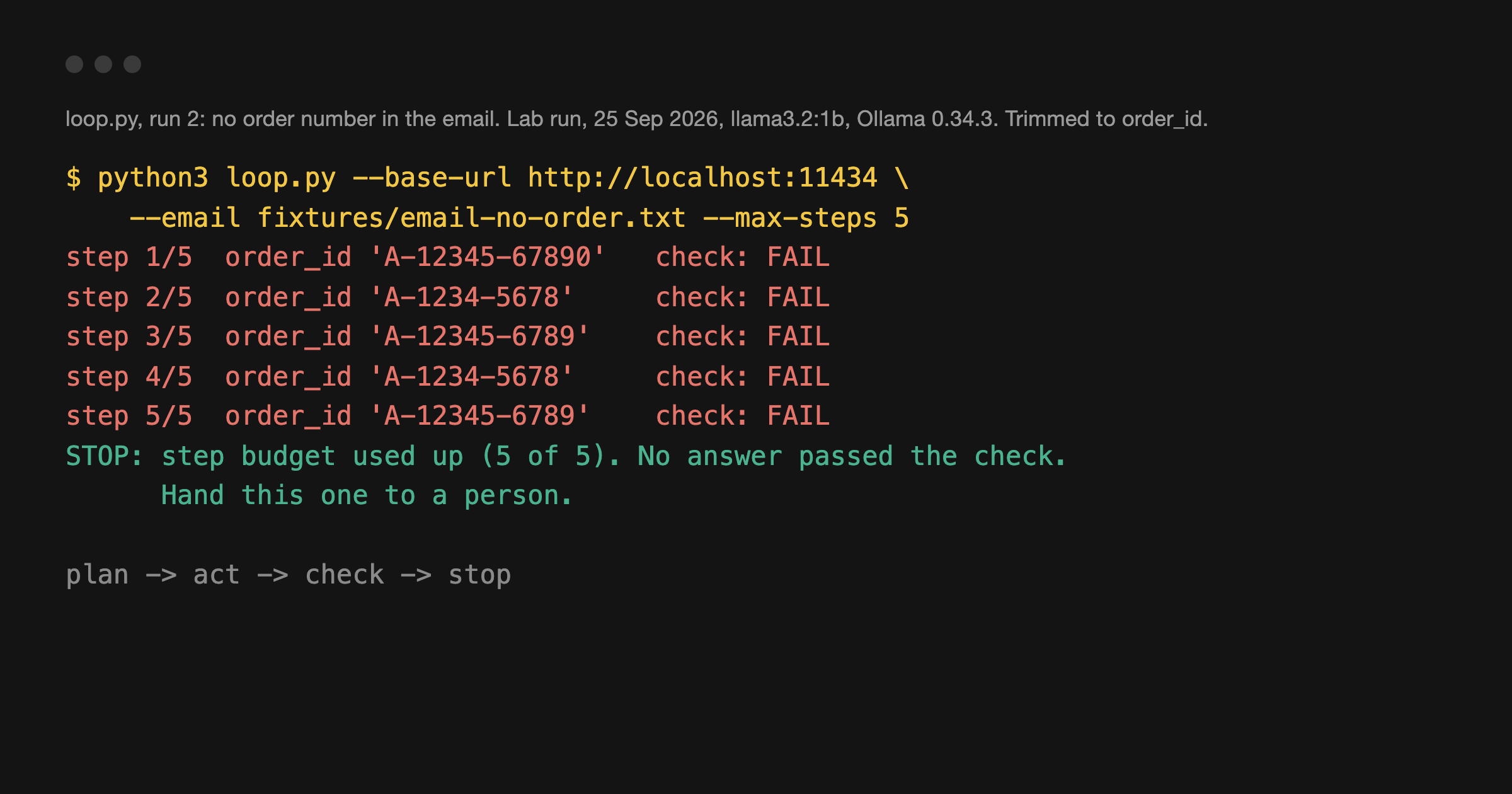
python3 loop.py --base-url http://localhost:11434 --email fixtures/email-no-order.txt --max-steps 5
loop.py  model=llama3.2:1b  budget=5 steps  email=email-no-order.txt
step 1/5  act:   {... "order_id": "A-12345-67890", ...}
          check: FAIL
            - order_id 'A-12345-67890' is not in the format A-12345
step 2/5  act:   {... "order_id": "A-1234-5678", ...}
          check: FAIL
            - order_id 'A-1234-5678' is not in the format A-12345
step 3/5  act:   {... "order_id": "A-12345-6789", ...}
          check: FAIL
step 4/5  act:   {... "order_id": "A-1234-5678", ...}
          check: FAIL
step 5/5  act:   {... "order_id": "A-12345-6789", ...}
          check: FAIL
STOP: step budget used up (5 of 5). No answer passed the check. Hand this one to a person.
Exit code 2. Shortened; each step printed the full JSON. The model invented an order number every time, then swapped between two made-up ones. The feedback told it exactly what was wrong, and it still could not produce a number that was never there. Without the budget, this loop has no reason to end.
Run 3: a better stop rule
The fix is not more retries. It is a rule that admits the answer can be missing. --allow-missing-order lets order_id be null when the email has no order number, and tells the model so:
python3 loop.py --base-url http://localhost:11434 --email fixtures/email-no-order.txt --max-steps 5 --allow-missing-order
loop.py  model=llama3.2:1b  budget=5 steps  email=email-no-order.txt
step 1/5  act:   {
 "customer_email": "sam@example.com",
 "order_id": null,
 "category": "other",
 "urgent": false
}
          (29 tokens, 0.32 s)
          check: PASS
STOP: check passed at step 1 of 5.
answer: {"customer_email": "sam@example.com", "order_id": null, "category": "other", "urgent": false}
next: no order number in the email, so a person asks the customer for it.
One step instead of five, and an honest answer. The category came back other where shipping fits better. Same lesson as run 1.
How do you write a stop rule that holds?
- Two exits, always. A check that passes, and a hard step budget. Test both.
test_loop.pyhas a test that the loop "never goes past" the budget. - Check against the input. Every value the model returns should be traceable to something it was given, or to a rule you wrote.
- Make "not found" a valid answer. Run 2 burned five calls on a question with no answer. Run 3 spent one.
- Exit codes a scheduler can read.
loop.pyexits 0 when the check passed, 2 when the budget ran out and 1 on a model error. A shell wrapper, an n8n workflow or a CI job can branch on each one. - Log every step.
--log run.jsonlappends one JSON line per step with the reply, the failures and the time. When a loop misbehaves at 3 a.m., that file is the only witness.
Loop engineering vs prompt engineering
| Prompt engineering | Loop engineering | |
|---|---|---|
| The unit of work | One instruction | A cycle of plan, act, check, stop |
| Who judges the output | You, reading it | A check you wrote, every time |
| What fails quietly | A bad answer you did not read | A loop with no budget, or a check that tests the wrong thing |
| What you can test | Mostly by eye | Plan, check and stop, with no model at all |
You still write prompts. plan() holds one. Loop engineering is the part that decides what happens when the prompt is not enough.
How do I run it myself?
You need Python 3.12 and Ollama listening on localhost:11434 with llama3.2:1b pulled. The LM Studio vs Ollama post has the Docker setup. Then download loop-engineering-example.zip: loop.py, test_loop.py, the two sample emails, and the JSON Lines logs of the three runs above.
unzip loop-engineering-example.zip
cd loop-engineering-example
python3 -m unittest test_loop.py
python3 loop.py --base-url http://localhost:11434 --email fixtures/email-with-order.txt
python3 loop.py --base-url http://localhost:11434 --email fixtures/email-no-order.txt --max-steps 5
The tests need no model and no network: act() is replaced with a fake that returns scripted replies. You should see Ran 15 tests and OK before you call the model once. The files are provided as is. Run them on your own machine.
Frequently asked questions
What is loop engineering?
Designing the loop an AI agent runs: what it plans next, what it may do, how each result is checked, and the rules that make it stop.
What is an agentic loop?
A cycle in which a model takes an action, gets feedback and uses it to decide the next action, until a stop condition is met. The model is one step. Planning, checking and stopping are code.
How is loop engineering different from prompt engineering?
Prompt engineering improves one instruction. Loop engineering designs the system around many model calls: the check, the feedback and the stop.
What is a ReAct agent loop?
ReAct, from the 2022 paper by Yao and others, interleaves reasoning traces and actions: reason, act, observe, reason again. The loop here is simpler. The model only acts, and plain code checks the result.
How do you stop an AI agent loop from running forever?
A check that passes and a step budget that caps attempts, with a clean hand-off to a person when the budget runs out. In run 2 above, only the budget ended the loop.
Sources
- Lab runs, 25 September 2026:
loop.pyandtest_loop.py(15 tests, OK), three runs onllama3.2:1b(digestbaf6a787fdff) on Ollama 0.34.3, on Metal and on CPU in Docker, with identical output. The Metal run logs are in the download, underruns/. - IBM, What Is Loop Engineering?, Ivan Belcic and Cole Stryker, 17 July 2026.
- LangChain, The Art of Loop Engineering, Sydney Runkle, 16 June 2026.
- Yao and others, ReAct: Synergizing Reasoning and Acting in Language Models, arXiv 2210.03629, first submitted 6 October 2022.
- Search volume: DataForSEO data in House of Loops keyword research (
docs/marketing/research, September 2026), US, monthly.
Claude Code for Builders is a Premium course in the House of Loops classroom. Lesson 6, guardrails before you run agent code in production, covers permission modes, keeping secrets out of the session and a checklist before anything touches live data. See it on the syllabus, then join House of Loops free on Skool to start with the free courses.
Shannon Atkinson
House of Loops is a free community for people who would rather own their automation stack than rent it: n8n, Claude Code, AI agents, local models and the self-hosting underneath them, across 44 courses in the classroom.
Join Our Community