LM Studio vs Ollama: Which Local LLM App Should You Run?
Run LM Studio if you want a desktop app to find, download and chat with models on your own computer. Run Ollama if something else has to call the model, like an n8n workflow, a script or a Docker Compose stack, because it has an official multi-arch Docker image, an MIT licence and runs headless by design.
Both run open models on your own hardware. Both expose an OpenAI-compatible API. The difference is the shape of the tool, and on a Mac, where it runs matters more than which one you pick.
Tested on 25 September 2026 on an Apple M1 Ultra with 128 GB of memory, macOS 27.2, Docker Engine 29.8.0 in Docker Desktop. Ollama 0.34.3, natively and as ollama/ollama:0.34.3, the version the House of Loops courses pin. LM Studio's official headless image lmstudio/llmster-preview:cpu, pushed 18 September 2026, running llama.cpp engine 2.41.0. The LM Studio desktop app was not part of this run. Ollama 0.34.4 came out on 23 September and is not tested here.
What is a local LLM?
A local LLM is a language model that runs on hardware you control: a laptop, a desktop or your own server. With a local model and no cloud features or outbound integrations switched on, your prompts and your data stay on that machine. You pay for it in RAM, disk and speed instead of per token.
LM Studio and Ollama are two ways to run one. Neither is the model. Each downloads open model files, loads them into memory and answers requests.
How do LM Studio and Ollama differ?
| LM Studio | Ollama | |
|---|---|---|
| What it is | Desktop app, plus the llmster daemon since 0.4.0 | Background service and CLI |
| Licence | Proprietary, free for personal and internal business use | MIT |
| Official Docker image | Preview only: amd64, CPU | amd64 and arm64, with NVIDIA and AMD GPU options |
| Local API | OpenAI-compatible plus its own REST API, port 1234 | OpenAI-compatible plus its native API, port 11434 |
| Model formats | GGUF, and MLX on Apple silicon | Its own library, imported GGUF, and MLX for some tags on Apple silicon |
| Best at | Browsing models and chatting in a window | Serving a model to other programs, headless |
The images are lmstudio/llmster-preview and ollama/ollama. LM Studio's own API lives under /api/v1/, next to the OpenAI-style /v1/, and lms get takes --gguf or --mlx. llmster shipped with LM Studio 0.4.0 on 28 January 2026. The lms CLI is MIT licensed even though the app is not.
Sources, checked 25 September 2026: LM Studio's headless docs, developer docs, 0.4.0 release post and app terms (updated 23 August 2026); the llmster-preview page on Docker Hub; Ollama's Docker docs, import docs and MLX post (30 March 2026); licences from the GitHub API for ollama/ollama and lmstudio-ai/lms.
How fast is each one, measured?
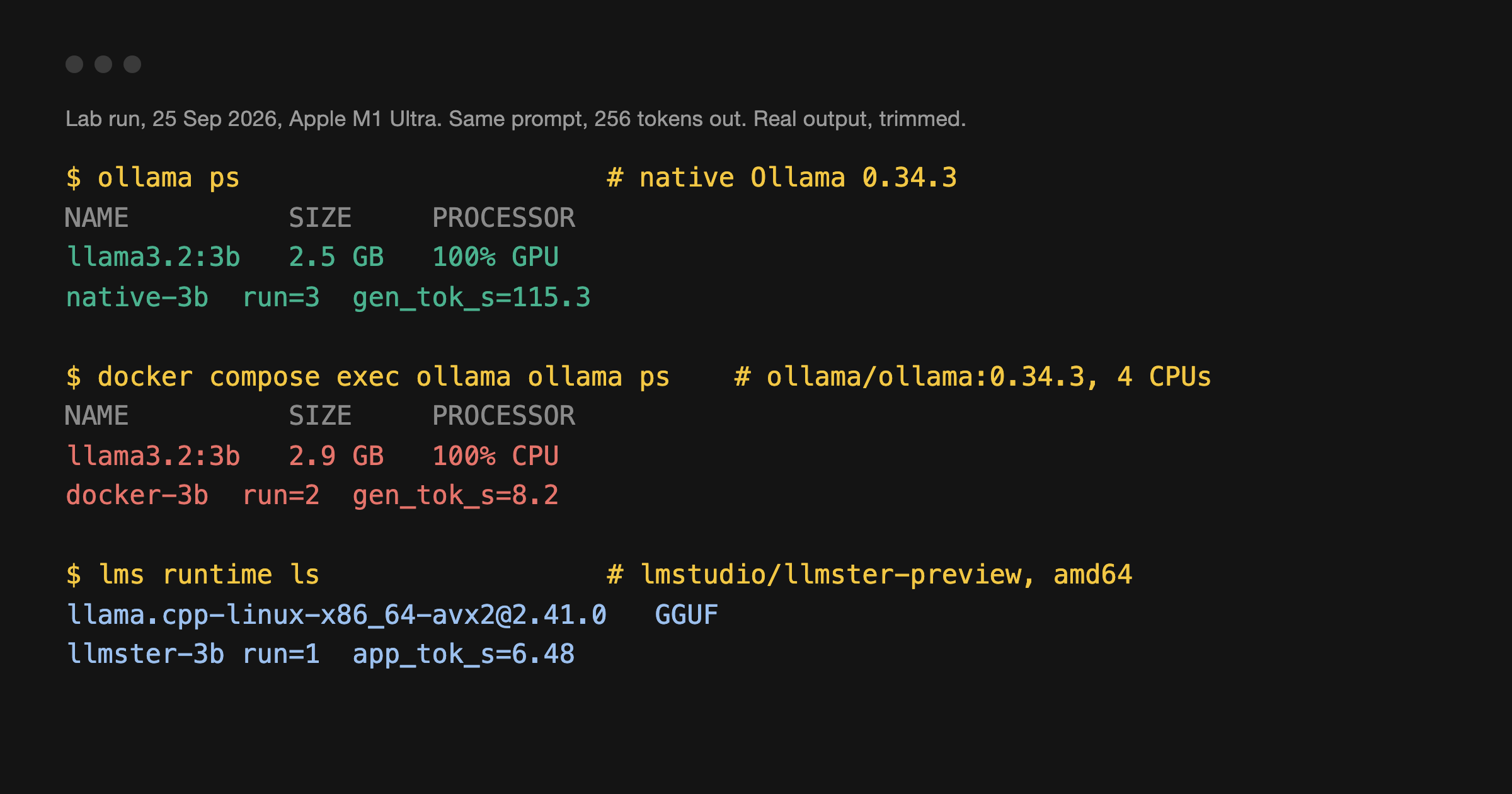
Speed depends far more on where the model runs than on which app runs it. Every row below uses the same prompt from lesson 5 of the Local LLMs with Ollama course, "Write a three paragraph explanation of Docker volumes.", with temperature 0 and 256 tokens out. Each figure is the median of every measured run, six to eight per cell over two or three passes, each pass after one warm-up call. The range is in brackets. 3B is Llama 3.2 3B and 8B is Llama 3.1 8B, both Q4_K_M. ollama ps showed 100% GPU for the native runs and 100% CPU in the container. In the lab each Docker container was capped at cpus: 4, and Ollama in Docker was sent num_thread: 4, so both apps had the same budget. The Mac was shared with other lab containers during the runs, which is why some ranges are wide.
| Setup, same Mac | 3B, tokens/s | 8B, tokens/s |
|---|---|---|
| Ollama 0.34.3, native, on the GPU | 117 (106 to 129) | 70 (38 to 72) |
| Ollama 0.34.3 in Docker, 4 CPUs | 7.8 (7.3 to 8.2) | 3.5 (2.7 to 3.9) |
| LM Studio llmster in Docker, 4 CPUs, amd64 emulated | 6.4 (6.0 to 6.9) | not run |
Three things stand out.
- Docker on a Mac has no GPU. Docker's own docs say GPU support in Docker Desktop is only available on Windows with the WSL2 backend. Native Ollama used the M1 Ultra's GPU. The container could not, so the 3B model ran about 15 times slower.
- In the same box, the two apps are close. With Llama 3.2 3B at Q4_K_M and the same 4-CPU budget, Ollama's arm64 image and LM Studio's emulated amd64 image were one or two tokens a second apart.
- Native Ollama on Apple silicon is fast enough for chat. At about 70 tokens a second for an 8B model, it writes faster than you can read.
Measure your own hardware. Don't trust mine, or anyone's. This is the call from lesson 5 of the course, with the options the table used. It returns eval_count and eval_duration:
curl http://localhost:11434/api/generate -d '{
  "model": "llama3.2:3b",
  "prompt": "Write a three paragraph explanation of Docker volumes.",
  "stream": false,
  "options": {"temperature": 0, "seed": 42, "num_predict": 256, "num_ctx": 4096}
}'
Tokens per second is eval_count / (eval_duration / 1e9). That counts generation only, not the model load, so run it twice and ignore the first.
Which one works headless in Docker?
Ollama. It was built for it, and the course stack runs it this way. This is the compose file from lesson 1 of Local LLMs with Ollama, pinned to the tested version:
services:
  ollama:
    image: ollama/ollama:0.34.3
    container_name: ollama
    restart: unless-stopped
    ports:
      - '127.0.0.1:11434:11434'
    volumes:
      - ollama_data:/root/.ollama
    environment:
      OLLAMA_KEEP_ALIVE: 30m
    networks:
      - hol_net

networks:
  hol_net:
    external: true

volumes:
  ollama_data:
Bring it up, pull a small model and check where it runs:
docker network create hol_net
docker compose -f compose.ollama.yml up -d
docker exec -it ollama ollama pull llama3.2:3b
docker exec -it ollama ollama ps
The port is bound to 127.0.0.1 on purpose. Ollama has no login, so never publish 11434 on a public address.
Can LM Studio run headless in Docker?
Yes, with two caveats. LM Studio's official image is a technical preview, and its Docker Hub page says it is "CPU-only support on x86 systems". There is no arm64 build. Docker Desktop on Apple silicon ran it under x86 emulation. On an ARM Linux server, use an x86 machine instead, or set up x86 emulation first.
Publishing port 1234, as the Docker Hub quick start does, was not enough in this run. The image starts lms server start --port 1234, and lms binds 127.0.0.1 by default, so every request from the host got curl: (52) Empty reply from server. The container log showed why: [SystemExternalAPIProvider] 1234 false 127.0.0.1. The --bind help text names the fix, the LMS_SERVER_HOST variable. This is the compose file that worked, pinned by digest. Save it as compose.yml in an empty folder:
services:
  llmster:
    image: lmstudio/llmster-preview@sha256:dddeba2f77e34a23b8de772e36589d0c6e66f43dc4bbdedb44a45a6e821e1d0a
    platform: linux/amd64
    environment:
      # The image runs `lms server start --port 1234`, which binds 127.0.0.1 unless told otherwise.
      LMS_SERVER_HOST: 0.0.0.0
    ports:
      - '127.0.0.1:1234:1234'
    volumes:
      - lmstudio_home:/root/.lmstudio

volumes:
  lmstudio_home:
Then download and load a model inside it. The @Q4_K_M suffix picks the same quantisation Ollama's llama3.2:3b tag uses:
docker compose up -d
docker compose exec llmster lms get "https://huggingface.co/lmstudio-community/Llama-3.2-3B-Instruct-GGUF@Q4_K_M" -y
docker compose exec llmster lms ls
docker compose exec llmster lms load llama-3.2-3b-instruct
curl http://127.0.0.1:1234/v1/models
lms ls lists the model as llama-3.2-3b-instruct, the name lms load takes. It works. For a server you depend on, I would still wait for a release that is not a preview and has an arm64 build.
What about llama.cpp and vLLM?
llama.cpp vs Ollama. llama.cpp is the MIT-licensed inference engine underneath both apps for GGUF models. In the lab, lms runtime ls listed llama.cpp-linux-x86_64-avx2@2.41.0 as LM Studio's engine, and Ollama's own container log printed llama.cpp's server timing lines while it ran Llama 3.2. Run llama.cpp directly when you want the engine with nothing around it and are happy to manage model files and flags yourself. Run Ollama or LM Studio when you want model downloads, a model list and a stable API handled for you.
vLLM vs Ollama. vLLM is an Apache-2.0 serving engine built to answer many requests at once. Its install docs list NVIDIA CUDA, AMD ROCm, Intel XPU, CPUs, and Apple silicon through a separate vLLM-Metal project (checked 25 September 2026). If you are serving a team or a product from a GPU server, look at vLLM. For one person or one workflow, it is more than you need. It was not tested here.
Which one should you run?
- Trying models on your own laptop. LM Studio. The model browser and chat window are the fastest way to find out what fits your RAM.
- A model an n8n workflow calls. Ollama, in the same Docker network as n8n. Lesson 4 of the course wires the Ollama Chat Model node to it by container name.
- A Mac that serves models to other machines. Native Ollama, not Docker, so it gets the GPU. Keep it off public addresses.
- A Linux server with an NVIDIA card. Ollama's image with the GPU override from lesson 1. That was not measured in this post.
- Many users at once on a GPU server. Look at vLLM.
If you use Claude Code, the Claude Code with Ollama post covers pointing it at a local model, and what breaks when you do.
Frequently asked questions
Is LM Studio or Ollama better?
Neither wins everywhere. LM Studio is the easier desktop app. Ollama is easier to run headless, because it ships an official Docker image for amd64 and arm64 and an MIT licence. Pick by where the model runs and who calls it.
Can LM Studio run in Docker?
Yes, as a technical preview. lmstudio/llmster-preview is CPU-only on x86. In a test on 25 September 2026 the API was not reachable from outside the container until LMS_SERVER_HOST was set to 0.0.0.0.
Is Ollama faster than LM Studio?
In Docker, with the same model at the same quantisation and the same CPU budget, they were close: a median of 7.8 tokens per second for Ollama and 6.4 for LM Studio's emulated image. Where you run it matters more. Native Ollama on the M1 Ultra's GPU was about 15 times faster than Ollama in Docker.
Does Ollama in Docker use the GPU on a Mac?
No. Docker Desktop only offers GPU support on Windows with WSL2. ollama ps showed 100% CPU in the container and 100% GPU for the native app on the same Mac.
Is LM Studio free for business use?
Its terms, updated 23 August 2026, allow personal and internal business use. They rule out running it as a service bureau, an application service provider or software as a service. The app is not open source. The lms CLI is MIT licensed.
What is a local LLM?
A model that runs on hardware you control instead of a vendor's API. With no cloud features or outbound integrations switched on, your prompts stay on the machine, and you live within your own RAM and speed.
Sources
- Lab run, 25 September 2026: Ollama 0.34.3 native and in Docker, LM Studio
llmster-previewin Docker, logs kept with this post's notes. - House of Loops course Local LLMs with Ollama, lessons 1, 2 and 5 (compose file, model sizes, the tokens-per-second formula).
- Docker Desktop GPU support: docs.docker.com/desktop/features/gpu, checked 25 September 2026.
- vLLM installation: docs.vllm.ai, checked 25 September 2026.
- LM Studio and Ollama pages as listed under the comparison table.
Local LLMs with Ollama is a free course in the House of Loops classroom: install, choosing a model, the API, wiring it into n8n, and measuring your own speed. See it on the syllabus, then join House of Loops free on Skool to open it.
Shannon Atkinson
House of Loops is a free community for people who would rather own their automation stack than rent it: n8n, Claude Code, AI agents, local models and the self-hosting underneath them, across 44 courses in the classroom.
Join Our Community