Is n8n Free? n8n Pricing Explained (Self-Hosted vs Cloud)
Yes, with conditions. The self-hosted n8n Community edition costs nothing to download and nothing to run, has no execution cap, and n8n's own docs describe it as carrying "almost the complete feature set". What you pay for is the machine it runs on and the hour a month you spend keeping it alive. Two conditions sit behind that yes:
- n8n Cloud is not free. That is the hosted version n8n operates for you, and it is a paid subscription with a 14 day trial.
- n8n is not open source in the OSI sense. It is fair-code, under the Sustainable Use License, which limits commercial use in ways a normal open source licence does not.
Everything below is those two conditions in detail.
Every claim here was read off n8n's own docs, pricing page and LICENSE.md on 10 September 2026. Editions and feature splits change, so treat this as a map of where to look rather than a quote: n8n.io/pricing and docs.n8n.io/choose-n8n.
1. The Licence, in Plain English
n8n calls itself fair-code, not open source, and the distinction is real. faircode.io defines fair-code as a software model, not a licence: the software is generally free to use and distributable by anybody, its source is openly available, anybody can extend it, and it is commercially restricted by its authors. That last clause is the one an OSI-approved licence would never contain.
The main branch of n8n is released under the Sustainable Use License, version 1.0. Its copyright grant is generous: a non-exclusive, royalty-free, worldwide, non-sublicensable, non-transferable licence to use, copy, distribute, make available and prepare derivative works of the software. Then the Limitations clause narrows it, and this is the sentence worth reading twice:
You may use or modify the software only for your own internal business purposes or for non-commercial or personal use. You may distribute the software or provide it to others only if you do so free of charge for non-commercial purposes.
Two more terms from the same file. You may not alter, remove or obscure n8n's licensing or copyright notices, and anyone you give a copy to must receive the terms with it. Three things sit outside the Sustainable Use License entirely: content on branches other than master is not licensed at all, third party components keep their own licences, and any source file with .ee. in its filename or .ee in its directory name requires a valid n8n Enterprise License under a separate LICENSE_EE.md.
What that means in practice. Running n8n inside your company, on your own server, to automate your own work is squarely within the licence. Building workflows for a client on their instance is normal internal business use for them. Where you need to slow down and read the actual text is anything that hands n8n itself to third parties, or any distribution that is not free of charge and non-commercial. The licence is broader than a simple "do not resell hosting" rule, so do not take a summary, including this one, as legal advice on a product you intend to sell.
2. The Four Self-Hosted Editions
Every self-hosted installation runs the same underlying product. What changes is which features a licence key unlocks. From n8n's choose-n8n page, checked on 10 September 2026:
| Edition | Cost | What it adds |
|---|---|---|
| Community | Free | Almost the complete feature set, no execution cap |
| Registered Community | Free, email required | Folders, debug in editor, custom execution data |
| Business | Paid licence key | SSO, environments, projects, Git version control |
| Enterprise | Paid licence key | The most advanced security, scaling and governance |
Registering costs nothing and takes a minute: Settings > Usage and plan > Unlock, enter an email, and n8n sends a free licence key. There is no reason not to.
What the free Community edition does not include, per the docs: custom variables, environments, external secrets, external storage for binary data, log streaming, multi-main mode, projects, SSO via SAML or LDAP, sharing workflows and credentials with other users, and Git version control.
Read that list carefully, because two entries are narrower than they look. Plain logging is included, only streaming those logs to an external service such as Datadog is paid. And queue mode is included, only multi-main mode is paid, which means you can scale a free instance across worker containers exactly as our queue mode guide describes.
The sharing limitation is the one that catches teams. On Community, only the instance owner and the person who created a workflow or credential can access it. If three people need to co-own the same automations, that is the wall you hit first, long before volume becomes an issue.
3. How n8n Cloud Bills You
n8n Cloud is the managed option: n8n runs the instance, applies the updates and takes the pager. It is billed on monthly workflow executions, regardless of complexity, and the plan cards spell out that those executions come "with unlimited steps".
That phrase is the whole pricing argument. One execution is one run of one workflow, from trigger to finish. A workflow with four nodes and one with forty each burn a single execution. Under a per-task model the forty node workflow costs roughly ten times the four node one, which quietly punishes you for building the thing properly. On an execution model, splitting logic into more steps is free.
Beyond the execution allowance, the plans differ on the limits that bite in production: concurrent executions, saved executions, saved-execution storage, log retention and workflow history. Current allowances live on n8n.io/pricing. One naming trap: the docs list the Cloud plans as free trial, Starter, Pro and Enterprise, while Business appears on the pricing page as a self-hosted plan. Read the "hosted by n8n" or "self-hosted" label on each card before you assume which one you are buying.
The free trial runs 14 days and gives you the Pro feature set with a cap of 1,000 executions and Starter-level compute. The pricing page states "No credit card required" beneath the trial buttons. You do not need to cancel: the trial expires by itself, no charge occurs, and n8n then deletes the workspace, though you have 90 days afterwards to download your workflows.
4. What "Free" Actually Costs
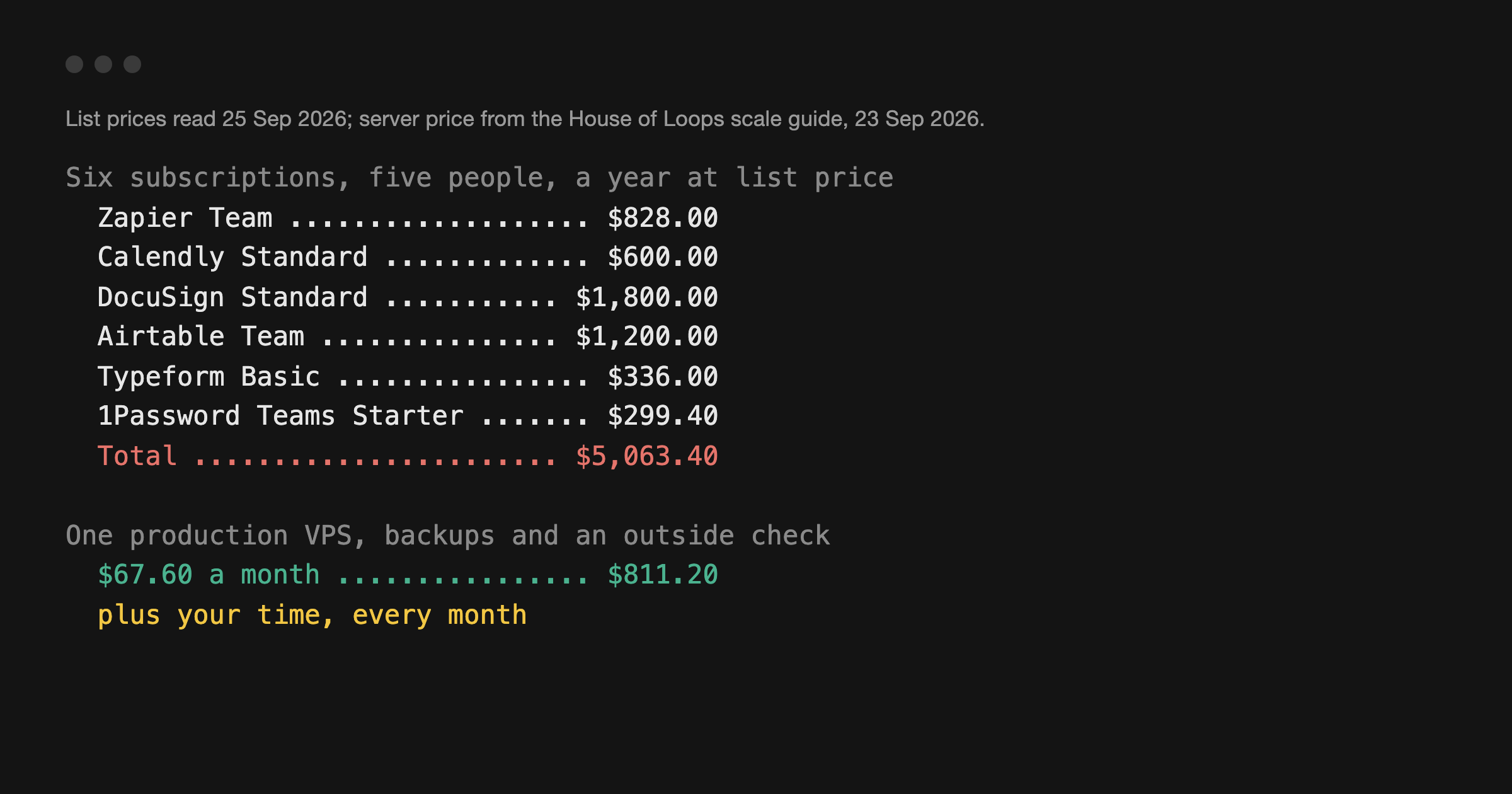
Self-hosted n8n has no licence fee. It is not free of cost. Honest ledger:
- A server. One flat monthly bill, the same in a quiet month and a busy one. This is the entire financial argument for self-hosting.
- Postgres. SQLite is fine on day one and a liability by month six. Budget for a real database.
- Backups you have tested. An untested backup is a rumour, and your credentials live in that database.
- Updates. n8n 3.0 in October 2026 is Docker-only, so the npm install path is a dead end. Our Docker Compose guide is built for that.
- Your time. An hour a month if things go well. A weekend when they do not.
- Workers, eventually. When executions start queueing you move to queue mode and run separate worker containers, which means more memory and more moving parts.
The tipping point is not a number of executions, it is a question about your time. If an hour a month of maintenance is cheaper for you than a subscription, self-host. If your hour is worth more, or nobody on the team wants to own a server, pay for Cloud.
5. Cost Models, Not Prices: n8n, Zapier and Make
The three platforms meter fundamentally different units, which is why comparing headline prices tells you nothing.
| Platform | Unit billed | What one unit is |
|---|---|---|
| n8n Cloud | Workflow execution | One run of one workflow, any number of steps |
| n8n self-hosted | Nothing | Flat server cost, no metering |
| Zapier | Task | Any successful action that runs, per Zapier's help docs |
| Make | Credit | One module run, for a non-AI app |
Zapier's own documentation is precise: a task is any successful action that runs, only successful actions count, and every action step in a multi-step Zap counts separately. Make renamed its billing unit from operations to credits, and its help centre states that for non-AI apps one operation equals one credit, where an operation is a single module run. A module that processes ten bundles of data therefore spends ten credits. AI modules vary, because credits there can also track token usage.
So the same eight-step automation running a thousand times a month is one thousand billable units on n8n Cloud, and eight thousand or more on a per-task or per-credit platform. That difference grows with exactly the complexity that makes an automation worth building. For the feature-by-feature version, see our Zapier vs n8n vs Make comparison, or the head-to-heads on Zapier vs n8n and n8n vs Make.
None of which means n8n always wins. Hosted platforms bill more per unit because they carry the operational load you would otherwise carry yourself, and if you have never opened a terminal that is a fair trade. The broader field of options is worth a look before you commit.
6. Which One to Pick
Self-host the Community edition if you are comfortable with Docker, you want volume to stop mattering to your bill, your data needs to stay on infrastructure you control, or you want the AI nodes pointed at a local model. Register for the free key on day one. Start with the Docker Compose guide, then the self-hosting guide for the reverse proxy and TLS.
Pay for n8n Cloud if you want to build automations rather than operate servers, your volume is modest, or nobody on the team wants to be on call for a container at 2am.
You need a paid licence key if you need SSO, environments, projects, external secrets, log streaming, multi-main mode, or shared ownership of workflows and credentials across a team. Those are Business and Enterprise features whether you self-host or not.
7. What I Could Not Verify
- Whether a card is required for the Enterprise trial. The pricing page prints "No credit card required" for the self-serve trial. Enterprise goes through sales and those terms are not published.
- Exact current allowances and prices. Deliberately not quoted here, because they move. Read them off n8n.io/pricing the day you buy.
- Make's per-module credit rate beyond the default. Make's help centre says the default is one credit per operation for non-AI apps, but that some AI and advanced apps consume a varying number per run. Check the rate for the specific modules you use before modelling a bill.
Further reading
- n8n pricing: https://n8n.io/pricing/
- Choose how to use n8n: https://docs.n8n.io/choose-n8n/
- Compare plans and editions: https://docs.n8n.io/hosting/community-edition-features/
- The licence text itself: https://github.com/n8n-io/n8n/blob/master/LICENSE.md
- What fair-code means: https://faircode.io
Next step
If the answer is self-hosting, the Docker Compose guide gets you from nothing to a running instance, and the n8n tool page has the shorter overview.
If you would rather ask someone before you commit a weekend to it, join the House of Loops community. It is free, it is full of people running n8n on their own servers, and someone there has already hit whatever you are about to hit. More about who is behind this on the about page.
Shannon Atkinson
House of Loops is a free community for people who would rather own their automation stack than rent it: n8n, Claude Code, AI agents, local models and the self-hosting underneath them, across 44 courses in the classroom.
Join Our Community