A Google Analytics Alternative You Host Yourself: Umami vs Plausible
The simplest Google Analytics alternative you can host yourself is Umami: one app container and one Postgres database, about 245 MiB of memory at idle in a lab run. Plausible Community Edition answers the same questions from a third container, ClickHouse, which gives it headroom for busy sites and cost about 2 GiB at idle in the same run.
Both count visits without setting a cookie. Both keep the data in a database you own. The choice is how much you want to run.
Tested on 25 September 2026: Umami 3.4.0 with Postgres 18, and Plausible Community Edition v3.2.1 with Postgres 18 and ClickHouse 24.12, from the House of Loops course compose files, on Docker Engine 29.8.0 (Docker Desktop) on an Apple M1 Ultra. Both versions were the newest releases on GitHub that day. Hosted prices were read from umami.is and plausible.io the same day.
What does a Google Analytics alternative need to do?
Most small businesses ask four questions of their analytics. How many people came? Which pages did they land on? Where did they come from, including which newsletter or post? Did they click the thing that matters?
Umami and Plausible answer all four. A small script on your page sends a request on each page load. Neither sets a cookie or writes to localStorage. Each tells visitors apart with a hash of the IP address and user agent, salted with a value that rotates, then throws the inputs away. Plausible rotates that salt daily. Umami defaults to monthly and lets you change it.
Google Analytics answers the same questions by storing identifiers in the visitor's browser and sending the data to Google. Storing identifiers is what usually brings the cookie banner. Sending the data to a third party is what brings the data-processing terms.
Plausible vs Umami: how do they compare?
| Umami | Plausible Community Edition | |
|---|---|---|
| Containers | App plus Postgres | App plus Postgres plus ClickHouse |
| Version tested | 3.4.0 | v3.2.1 |
| Idle memory, measured | About 245 MiB (app 211, Postgres 34) | About 2 GiB (app 547 MiB, Postgres 76 MiB, ClickHouse 1.3 to 1.5 GiB) |
| Licence | MIT | AGPL-3.0 |
| Visitor hash salt | Monthly by default | Daily |
| Hosted version, 25 Sep 2026 | Free up to 100K events on 1 site; Pro $20 a month | From $9 a month, billed monthly, up to 10k pageviews |
Memory is three docker stats samples 20 seconds apart, both stacks idle, on a Docker VM that could see 31 GiB. ClickHouse was still climbing slowly between samples. The course file runs ClickHouse with its default settings. Plausible's own compose file adds low-resource ClickHouse settings for small setups, which I did not measure. A small VPS will show different numbers, so measure your own with docker stats. Licences are from the GitHub API for umami-software/umami and plausible/analytics. Prices are from umami.is/pricing and plausible.io.
The memory row is the whole decision for most people. ClickHouse is a column store built to aggregate very large event tables quickly. That is real headroom for a busy site, and it is also the single heaviest thing in the stack. On a 2 GB VPS that already runs n8n and Postgres, the course's basics lesson calls it the container most likely to push the box into swap.
The last idle sample, as docker stats printed it:
hol-cw-plausible-plausible_db-1 75.78MiB / 31.29GiB 0.30%
hol-cw-plausible-plausible_events_db-1 1.461GiB / 31.29GiB 8.57%
hol-cw-plausible-plausible-1 546.2MiB / 31.29GiB 2.11%
hol-cw-umami-umami_db-1 34.57MiB / 31.29GiB 0.00%
hol-cw-umami-umami-1 211.1MiB / 31.29GiB 0.00%
How do I run Umami in Docker?
This is the compose file from lesson 2 of the House of Loops Plausible and Umami Analytics course, the one used in the lab run, with its comments shortened:
services:
  umami_db:
    image: postgres:18
    restart: unless-stopped
    environment:
      POSTGRES_USER: ${POSTGRES_USER}
      POSTGRES_PASSWORD: ${POSTGRES_PASSWORD}
      POSTGRES_DB: ${POSTGRES_DB}
    volumes:
      - umami_db_data:/var/lib/postgresql
    healthcheck:
      test: ['CMD-SHELL', 'pg_isready -U ${POSTGRES_USER} -d ${POSTGRES_DB}']
      interval: 10s
      timeout: 5s
      retries: 5

  umami:
    image: umamisoftware/umami:3.4.0
    restart: unless-stopped
    # Bound to loopback on purpose. Put a reverse proxy in front before you use a domain.
    ports:
      - '127.0.0.1:3000:3000'
    depends_on:
      umami_db:
        condition: service_healthy
    environment:
      DATABASE_URL: postgresql://${POSTGRES_USER}:${POSTGRES_PASSWORD}@umami_db:5432/${POSTGRES_DB}
      APP_SECRET: ${APP_SECRET}
      DISABLE_TELEMETRY: ${DISABLE_TELEMETRY:-1}
    healthcheck:
      # 127.0.0.1, not localhost: this image resolves localhost to ::1 first.
      test:
        [
          'CMD-SHELL',
          'wget --no-verbose --tries=1 -O - http://127.0.0.1:3000/api/heartbeat || exit 1',
        ]
      interval: 10s
      timeout: 5s
      retries: 5

volumes:
  umami_db_data:
Put this .env next to it, with your own values:
POSTGRES_USER=umami
POSTGRES_PASSWORD=replace-me
POSTGRES_DB=umami_db
APP_SECRET=replace-with-the-output-of-openssl-rand-hex-32
DISABLE_TELEMETRY=1
Generate the secret and paste the output into APP_SECRET. Then start it, wait for the health checks and check it answers:
openssl rand -hex 32
docker compose --env-file .env -f compose.umami.yml up -d --wait
curl -s http://127.0.0.1:3000/api/heartbeat
You should see {"ok":true}. Two details from the course that matter:
- Postgres 18 takes its volume at
/var/lib/postgresql, not the/var/lib/postgresql/datapath older guides show. - The scheme is
postgresql://, notpostgres://. Umami's database layer is strict about it.
Change the default login first
Umami ships with the login admin and the password umami. Change it before the dashboard is reachable from anywhere. In the lab, the default login answered 200 before the change and 401 after it. Then add a website. Umami gives it an ID, and that ID, not the domain, is what the tracking script and the API key off.
How do I run Plausible Community Edition?
Plausible needs three services: Postgres for accounts, sites and goals, ClickHouse for events, and the app. Plausible publishes its own compose file in the community-edition repository. The course file uses the same Plausible and ClickHouse images and the same start command, with Postgres 18 where Plausible's file uses Postgres 16. Three settings cause most failed first boots with it:
openssl rand -base64 64   # SECRET_KEY_BASE
openssl rand -base64 32   # TOTP_VAULT_KEY, optional; if set, exactly 32 bytes
openssl rand -base64 24   # CLICKHOUSE_PASSWORD
CLICKHOUSE_PASSWORDmust be set in the course file. It sets a ClickHouse user and password, and Plausible connects over the network with the same password. Plausible's own compose file takes a different route,CLICKHOUSE_SKIP_USER_SETUP=1. Pick one file and follow it, not half of each.BASE_URLmust match the address in your browser, scheme included. A mismatch breaks the login redirect and the collect endpoint.- The app does not create its own databases. The start command runs
db createdb, thendb migrate, thenrun. In the lab, the first boot loggedDatabase plausible_events_db does not existerrors, thenMigration done!. Those errors are normal on a first boot.
Register your own account straight away, then set DISABLE_REGISTRATION=true and restart, so nobody else can sign up on your instance.
One change to know about: Plausible v3.2.1 no longer hands you the old data-domain snippet. After adding a site, the dashboard showed a per-site script at /js/pa-<id>.js plus a short plausible.init() block. Copy whatever your own dashboard shows rather than a snippet from an older guide.
What did the lab run show?
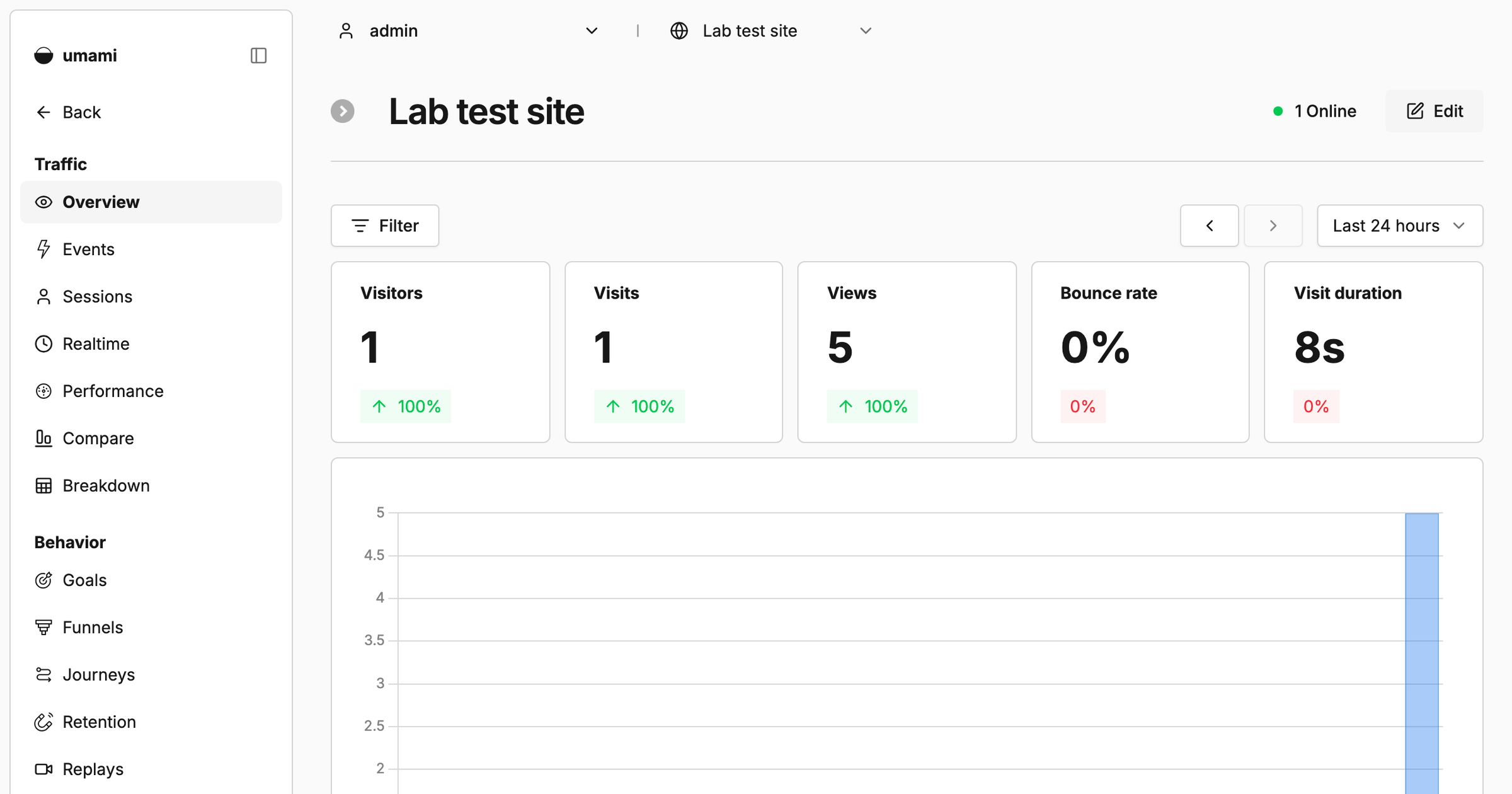
Five visits to a tracked test page, from five fresh browser profiles with different languages and window sizes, all on one machine. Umami counted 1 visitor, 1 visit and 5 views.
That is the hash doing its job. Same IP address and same browser string means same visitor, whatever the browser profile. On a real site, visitors behind one office network with the same browser can merge in the same way. The visitor number is an estimate, not an identity. Views and sources are the numbers to trust.
Do I still need a cookie banner?
Maybe not for these tools, but do not treat it as settled. Under GDPR and the ePrivacy Directive, consent is generally triggered by storing or reading something on the visitor's device. Plausible and Umami do neither, and both projects argue that puts them outside the consent requirement.
Two cautions from lesson 5 of the course. A rotating hash of an IP address and user agent is likely still personal data under GDPR, so name the tool in your privacy policy. And the answer depends on your jurisdiction, on what your configuration collects and keeps, and on what else runs on the page. With meaningful EU traffic and any doubt, ask someone who practises privacy law.
For the record, houseofloops.com runs PostHog, with a consent banner, because it does product analytics that need a persistent identifier once a visitor agrees. That is a different job from counting public traffic.
Which one should you pick?
- One or a few small sites on a small VPS. Umami. One database to back up, and a fraction of the memory.
- A site you expect to get busy. Plausible, for ClickHouse. Give it a box with memory to spare.
- You do not want to run a database at all. Pay for Umami Cloud or Plausible's hosted plan. Both fund the open-source work, and paying them is a legitimate choice.
- You need to know what one logged-in user did across sessions. Neither. That is product analytics, which is PostHog's job.
- Thirty visits a week and you already know where they come from. Run nothing yet.
If you are weighing more of your stack than analytics, the LM Studio vs Ollama post covers running AI models the same way, on hardware you control.
Frequently asked questions
What is the best self-hosted alternative to Google Analytics?
For most small sites, Umami: one app container and one Postgres database, MIT licensed, about 245 MiB at idle in the lab. Plausible Community Edition suits busy sites, at about 2 GiB at idle.
Is Umami better than Plausible?
Umami is lighter to run. Plausible is built for more traffic. Both count pageviews, sources, UTM campaigns and custom events without cookies.
Is Plausible Analytics free?
The Community Edition is free to self-host under AGPL-3.0. The hosted plans started at $9 a month, billed monthly, for up to 10,000 monthly pageviews on one site on 25 September 2026.
Is Umami free?
Self-hosted Umami is MIT licensed. Umami Cloud had a free Hobby plan for up to 100,000 events a month on one website, and Pro at $20 a month, on 25 September 2026.
Do Umami and Plausible need a cookie banner?
Neither sets a cookie, and both projects argue that keeps them outside the consent requirement. It depends on your jurisdiction and configuration, and the hash is likely still personal data under GDPR.
Does houseofloops.com use Umami or Plausible?
No. It runs PostHog, with a consent banner, for product analytics.
Sources
- Lab run, 25 September 2026: both course compose files with fresh secrets, the Umami login and website set up through its API, five tracked visits, a Plausible account, site and pageview,
docker statsat idle. Logs kept with this post's notes. - House of Loops course Plausible and Umami Analytics, lessons 0, 1, 2 and 5.
- umami.is/pricing and plausible.io, read 25 September 2026.
- GitHub API, 25 September 2026: licences and latest releases of umami-software/umami (v3.4.0) and plausible/analytics (v3.2.1).
Plausible and Umami Analytics is a Premium course in the House of Loops classroom. It runs both side by side behind Caddy, adds goals and UTM links, pulls last week's numbers into n8n every Monday, and proxies the script past ad blockers. See it on the syllabus, then join House of Loops free on Skool to start with the free courses.
Shannon Atkinson
House of Loops is a free community for people who would rather own their automation stack than rent it: n8n, Claude Code, AI agents, local models and the self-hosting underneath them, across 44 courses in the classroom.
Join Our Community